2.15 How to Configure Peakto Connect to Share Your Peakto Catalog
Prerequisites
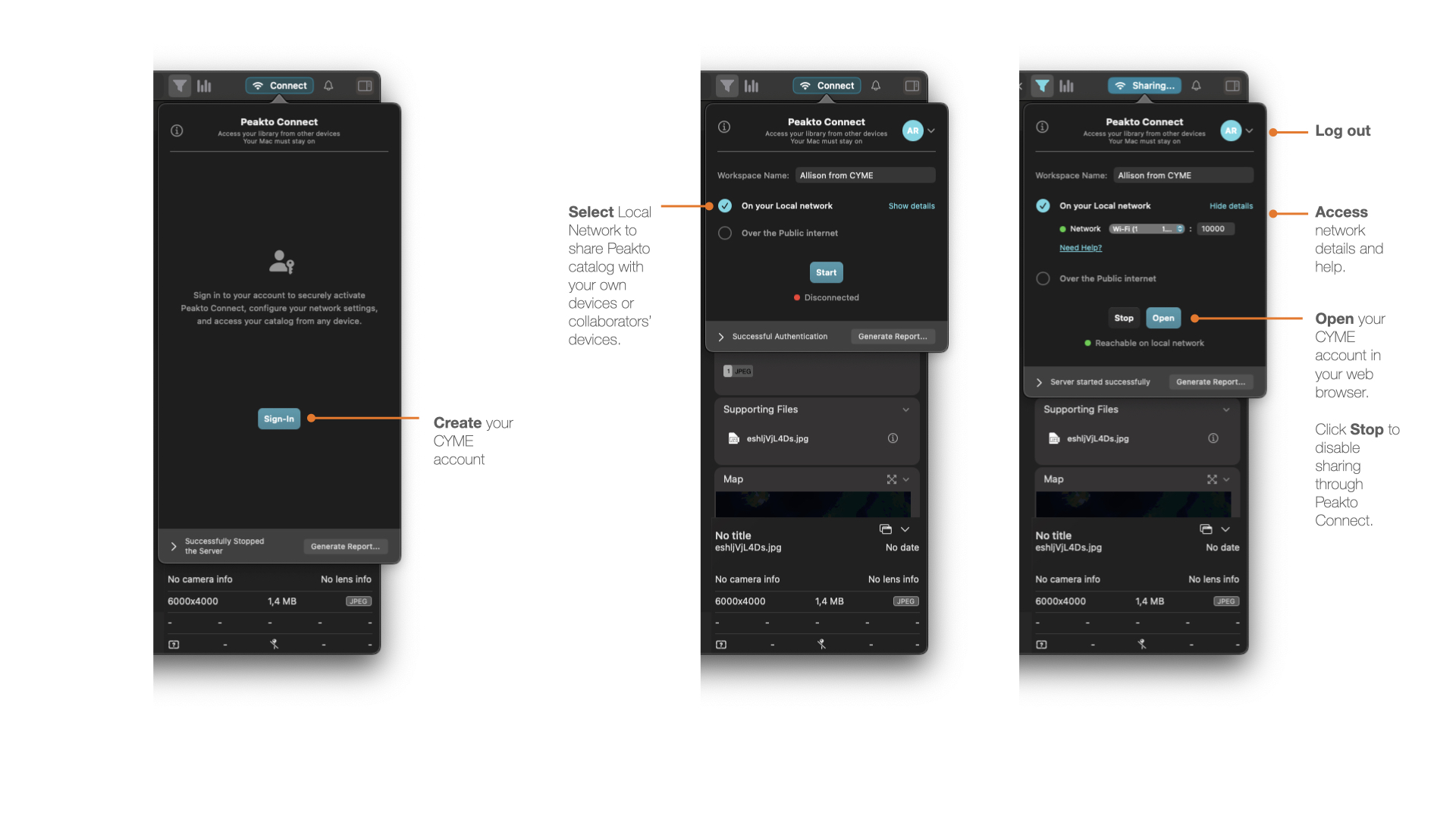
Before using Peakto Connect, make sure you are signed in to your CYME account.
You can sign in beforehand, or directly from Peakto by clicking the Share button in the top-right corner of the application.
Peakto Connect requires a secure connection on both ends: in Peakto and on the web, using the same CYME account.
Turn Peakto into a Workspace
To share your content, Peakto acts as a workspace, similar to a server, giving access to your Peakto catalog:
- To your entire catalog, if you are sharing it with yourself
- To selected content, if you are sharing it with guests or collaborators
You can name your Peakto Workspace in the Peakto Connect window. This is useful when sharing content with others, or when other users share their Peakto Workspace with you.
Choose How to Share Your Peakto Catalog
Peakto Connect offers two main access options:
- Local access: share your Peakto catalog on your local network, such as your home Wi-Fi or company network.
- Public access: share your Peakto catalog over the public internet through a secure connection between the remote device and your Mac.
For public access, you can choose between:
- A direct connection through your internet box or router
- Safe Mode (Relay), which uses a secure relay server
Safe Mode can be useful if you cannot configure your router or open ports. It requires no network configuration, but it may be slower than a direct connection depending on your bandwidth.
Enabling Local Access
- Select On your local network.
- Click Show details to view and select the network you want to use.
- Click Start.
Your Peakto catalog is now accessible from a browser.
Click Open to access the Peakto web interface. You can also access Peakto Connect from your CYME account on CYME.io or from: https://account.cloud.cyme.io/
To disable Peakto Connect, click Stop in the Peakto Connect panel.
For more detailed explanations, see the Peakto Connect Troubleshooting section.
 Enabling Public Access
- Select Over the public internet.
- Click Show details to select your network and IP address.
- Click Start.
Your Peakto catalog is now accessible from a browser.
Click Open to access the Peakto web interface. You can also access Peakto Connect from your CYME account on CYME.io or from: https://account.cloud.cyme.io
Skip router setup, use Relay
If you cannot use your router automatically or manually, use Relay mode.
1. Click Stop to disable the current public network connection.
2. Enable the Skip router setup (use Relay) option.
3. Click Start to establish the connection through the Relay server.
A Relay connection lets you access Peakto remotely without configuring your internet box or opening ports. Your connection goes through a secure relay server that helps establish the link between devices.
This option is easier to set up, but it may be slower than a direct connection depending on your bandwidth.
For more detailed explanations, see the Peakto Connect Troubleshooting section.